
Varify.io® Functions
Discover the different features of Varify.io® and how they help you for your experiments.
- Cookieless - Varify.io® does not use cookies
- Extremely small snippet for super fast loading web pages
- Test evaluations with the existing web analytics system
This is why companies choose Varify.io
A/B testing without limits
Test as many variants of your website as you like and measurably increase your conversion rate.
Fast & competent support
Our team will help you with every question - fast, friendly and solution-oriented.
Visual editor
Optimize your pages without any code - simply by drag & drop in the visual editor.
All functions at a glance
A/B Testing & Personalization
Test variants, personalize content and measurably increase your conversion rate.
Modular A/B testing
Determine the best version of your website and systematically increase your conversion rate.
AI CRO Audit
Create a complete CRO audit with one click, including specific optimization potential and potential test ideas.
Personalization
Enhance the user experience of your website with targeted adjustments for selected visitor groups.
Split URL Testing
Use the Split URL feature for accurate ratings of different page versions.
Multipage Testing
Test whether a complete conversion funnel works better than the original version.
Quick start
Start immediately with the Chrome extension to be able to test all functions immediately.
Automatic Goals
No time-consuming goal setup: With Varify.io®, all metrics of the analytics system are measured automatically.
Deploy function
Set your winning variant live immediately without having to wait for your dev team.
Onboarding support
Simple step-by-step guides will help you familiarize yourself with the platform in no time.
Cookieless
Varify.io® does not use cookies and does so with complete and accurate goal tracking.
Experiment API
Control your experiments and variants outside of the Varify app.
Targeting options
Test variants, personalize content and measurably increase your conversion rate.
Visual targeting editor
Define exactly when, where and for whom your experiments are displayed - without any programming effort.
Page targeting
Define on which pages and page types your experiments should take place.
Event Targeting
Trigger your experiments only when certain events are executed on your side.
Audience Targeting
Define the target audience that will be a part of your experiments.
IP address targeting
Only run your experiments for certain IP addresses or exclude them from participating in your experiments.
Quality assurance
Use the QA mode to make sure that everything is played out the way you want it.
Scheduling experiments
Start and stop your experiments according to rules you define.
Targeting parameters
Increase the relevance of your website by displaying targeted web pages for your various traffic campaigns.
Functions of the Varify.io Editor
Optimize content, layout and journey directly in the editor for quick tests and better conversion.
Dynamic Keyword Insertion
Use dynamic keyword insertion not only for ads, but also transfer keywords to your landing page.
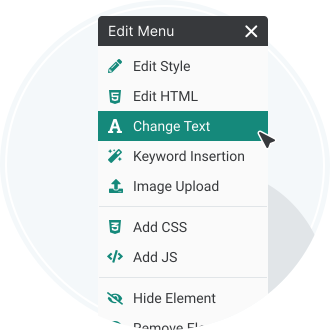
Change images and texts
Optimize landing page texts with a few clicks and get your visitors relevant to your ad campaigns.
Hide elements
Hide information like navigation elements or texts that might distract the user from the conversion.
Redirects
Change the customer journey of your website and direct your visitors to more relevant landing pages or landing page variants.
Move elements
Highlight certain elements by moving them to a different position with just a few clicks.
Breadcrum Selector
Use the Breadcrum Selector to precisely select the HTML elements you want to edit.
Change or add images
Enrich your content with the Edit Content function and add additional images to your landing page.
Insert videos
Videos can explain products more clearly and convey emotions. Why not add these via Edit Content as well?.
JavaScript and CSS
Are you familiar with Javascript and CSS? Then use your knowledge and optimize your website according to your own ideas.
Edit HTML
Edit HTML allows you to directly edit, delete or add new HTML code.
Device Switcher
Check your variant on different screen sizes and make your test responsive.
Technology, performance & safety
Fast snippet, global playout and high performance without slowing down your website.
Professional CDN
Thanks to our high-performance content delivery network, the JavaScript snippet and related A/B tests load extremely fast worldwide
Highest performance
The Varify.io® snippet has an initial size of 11.5kb and thus usually loads completely in under 30ms. So your web pages stay lightning fast.
Anti Flicker Snippet
The optional snippet helps with special cases so that no flicker effects occur in your experiments.
Multi Factor Authentication (MFA)
Make your login even more secure and use multi-factor authentication.
Tracking & analytics integrations
Set up your data collection in just a few clicks, evaluate experiments in your analytics tool and use in-app reports in real time.
Setup Wizard
Set up your individual data collection with Google Analytics 4 automatically and with just a few clicks. Start your first experiments immediately.
Google Analytics 4
Evaluate your A/B tests and personalizations directly in your GA4 account. The link is done in a few clicks.
GA4 In-App Tracking
Get an overview of A/B tests and personalizations directly in your Varify.io® dashboard. The data is collected and analyzed in real time from GA4.
Big Query In-App Tracking
Get an overview of A/B tests and personalizations directly in your Varify.io® dashboard. The data is collected and analyzed in real time from Big Query.
Counts in reporting
In addition to the tables, the reporting shows graphs with the daily progress of improvements, goals and users. Trends and changes are immediately visible.
Matomo
Evaluate your A/B tests and personalizations directly in Matomo. The link is done in just a few clicks.
Piwik Pro
Evaluate your A/B tests and personalizations directly in your Piwik Pro account. The link is done in just a few clicks.
Snowplow
Evaluate your A/B tests and personalizations directly with Snowplow. The link is done in just a few clicks.
Microsoft Clarity
Understand your visitors even better with session recordings and heatmaps for each of your test variants.
etracker
Evaluate your A/B tests and personalizations directly in your etracker account. The link is done in just a few clicks.
Hotjar
Understand your visitors even better with session recordings and heatmaps for each of your test variants.
Datalayer interface
Varify.io® offers the possibility to link further and also own tracking solutions with the platform.
Campaign Booster
Use smart elements to attract attention, improve orientation and convert more visitors into conversions.
Arrow Up
Add the Arrow up to particularly long pages so that visitors can navigate the page as comfortably as possible.
Exit Intent Layer
Use your 2nd chance and motivate your visitors who intend to leave your site to convert.
Information bar
Promote special promotions or point out current news or offers.
Notifications
Target the attention of your visitors and promote your marketing campaigns.
USP Bar
Stand out from your competitors and highlight your outstanding products and services.
Functions in comparison
Compare all functions and see at a glance which features are included in which plan.
Main differences
|
Monthly Tested User (MTU) |
Growth Plan:unlimited |
Per plan: unlimited |
Enterprise Plan: unlimited |
|
Number of domains/websites |
Growth Plan:1 |
Per plan:1 |
Enterprise Plan:1 |
|
Multiple domains/websites |
Growth Plan:on request |
Per plan:on request |
Enterprise Plan:on request |
|
Number of subdomains |
Growth Plan:unlimited |
Per plan:unlimited |
Enterprise Plan:unlimited |
|
Active experiments |
Growth Plan:5 |
Per plan:unlimited |
Enterprise Plan:unlimited |
|
Active deploys |
Growth Plan:10 |
Per plan:unlimited |
Enterprise Plan:unlimited |
|
Goals per experiment |
Growth Plan:unlimited |
Per plan:unlimited |
Enterprise Plan:unlimited |
|
Number of user-defined segments |
Growth Plan:unlimited |
Per plan:unlimited |
Enterprise Plan:unlimited |
|
Monthly price with annual payment |
Growth Plan:149 € |
Per plan:249 € |
Enterprise Plan:Price on request |
|
Annual price |
Growth Plan:1.788 € |
Per plan:2.988 € |
Enterprise Plan:Price on request |
|
Monthly price |
Growth Plan:199 € |
Per plan:349 € |
Enterprise Plan:Price on request |
|
Development environments (staging / UAT) |
Growth Plan:no |
Per plan:ja |
Enterprise Plan:ja |
|
Adjusted payment & contract terms |
Growth Plan:no |
Per plan:no |
Enterprise Plan:ja |
Experiences
|
Plan |
Growth |
Pro |
Enterp. |
|
A/B Testing |
|
|
|
|
Split URL Testing |
|
|
|
|
Personalization |
|
|
|
Functions
|
Plan |
Growth |
Pro |
Enterp. |
|
Visual editor |
|
|
|
|
Code editor |
|
|
|
|
Preview link |
|
|
|
|
QA Mode |
|
|
|
|
Traffic Allocation |
|
|
|
|
Schedule Experiments |
|
|
|
|
Mutual exclusion of experiments |
|
|
|
Visual editor
|
Plan |
Growth |
Pro |
Enterp. |
|
Text changes |
|
|
|
|
Style changes |
|
|
|
|
Exchange of images |
|
|
|
|
Moving elements |
|
|
|
|
Add new HTML |
|
|
|
|
Change HTML |
|
|
|
|
Duplicate elements |
|
|
|
|
Add or change links |
|
|
|
|
Keyword Insertion |
|
|
|
|
Campaign Booster |
|
|
|
|
Single Page Application Supported |
|
|
|
|
AI Prompt Based Testing (Soon) |
|
|
|
Audience Targeting
|
Plan |
Growth |
Pro |
Enterp. |
|
Browser |
|
|
|
|
Browser language |
|
|
|
|
Cookie |
|
|
|
|
Device |
|
|
|
|
IP address |
|
|
|
|
JavaScript |
|
|
|
|
Platform |
|
|
|
|
Session storage |
|
|
|
|
Local storage |
|
|
|
|
URL Query Parameter |
|
|
|
|
URL referrer |
|
|
|
|
Geolocation |
|
|
|
Page targeting
|
Plan |
Growth |
Pro |
Enterp. |
|
URL targeting incl. match types |
|
|
|
|
Targeting via CSS Selector |
|
|
|
|
Targeting via JavaScript |
|
|
|
Security & Compliance
|
Plan |
Growth |
Pro |
Enterp. |
|
Multi Factor Authentication (MFA) |
|
|
|
|
MFA compulsory recruitment at team level |
|
|
|
|
Activity Log |
|
|
|
|
Login History |
|
|
|
|
Active Sessions Log |
|
|
|
Privacy
|
Plan |
Growth |
Pro |
Enterprise |
|
Cookieless at the end-user delivery |
|
|
|
|
CNAME: Individual delivery of the Varify script via a freely configurable subdomain |
|
|
|
Integrations
|
Plan |
Growth |
Pro |
Enterp. |
|
Google Analytics 4 |
|
|
|
|
Google Analytics 4 (Shopify Custom Pixel) |
|
|
|
|
Google Tag Manager |
|
|
|
|
BigQuery |
|
|
|
|
Matomo |
|
|
|
|
Adobe Analytics |
|
|
|
|
Fullstory |
|
|
|
|
Mixpanel |
|
|
|
|
etracker |
|
|
|
|
Piano |
|
|
|
|
Snowplow |
|
|
|
|
Tealium |
|
|
|
|
MS Clarity |
|
|
|
|
Mouseflow |
|
|
|
|
Hotjar |
|
|
|
|
Contentsquare |
|
|
|
|
PostHog |
|
|
|
|
Custom Tracker |
|
|
|
|
CRM integrations |
|
|
|
Roles & authorization management
|
Plan |
Growth |
Pro |
Enterp. |
|
Set predefined user roles |
|
|
|
|
Creating new user roles |
|
|
|
|
Allocation of individual authorizations |
|
|
|
API
|
Plan |
Growth |
Pro |
Enterprise |
|
Experiments API |
|
|
|
|
Reporting API |
|
|
|
Internal reporting
|
Plan |
Growth |
Pro |
Enterp. |
|
Evaluation of Google Analytics 4 Goals |
|
|
|
|
Evaluation of BigQuery Goals |
|
|
|
|
Evaluation of Shopify Goals |
|
|
|
|
Evaluation of PostHog Goals |
|
|
|
GA 4: Internal reporting
|
Plan |
Growth |
Pro |
Enterp. |
|
Auto-import of all GA4 events, metrics and key events |
|
|
|
|
Automatic creation & archiving of audiences |
|
|
|
|
Evaluation based on events and users possible |
|
|
|
|
Cross Device Tracking |
|
|
|
BigQuery: Internal Reporting
|
Plan |
Growth |
Pro |
Enterp. |
|
Automatic import of all BigQuery events |
|
|
|
|
Cross Device Tracking |
|
|
|
|
Segmentation according to cross-device tracking |
|
|
|
Shopify: Internal reporting
|
Plan |
Growth |
Pro |
Enterp. |
|
Automatic import of the number of all sales |
|
|
|
|
Automatic import of all sales |
|
|
|
|
Segmentation by product |
|
|
|
|
Segmentation according to product variants |
|
|
|
PostHog: Internal reporting
|
Plan |
Growth |
Pro |
Enterp. |
|
Automatic import of all PostHog Goals |
|
|
|
|
Segmentation based on specific properties possible |
|
|
|
Functions: Internal reporting
|
Plan |
Growth |
Pro |
Enterp. |
|
Segmentation of the results |
|
|
|
|
Setting the baseline variant |
|
|
|
|
Significance test of the results |
|
|
|
|
Outlier Smoothing |
|
|
|
|
CSV export of raw data |
|
|
|
|
Sharing results reports |
|
|
|
Payment
|
Plan |
Growth |
Pro |
Enterp. |
|
Credit card |
|
|
|
|
Bank transfer |
|
|
|
|
Paypal |
|
|
|
Technical support
|
Plan |
Growth |
Pro |
Enterp. |
|
E-mail |
|
|
|
|
Chat |
|
|
|
|
Slack |
|
|
|
|
Prime Support |
|
|
|
|
Phone |
|
|
|
Services
|
Plan |
Growth |
Pro |
Enterp. |
|
Free tracking setup |
|
|
|
|
Guided onboarding |
|
|
|
|
Weekly check-ins |
|
|
|
|
Account & Success Manager |
|
|
|
|
CRO Consulting |
|
|
|
|
Development experiment |
|
|
|
|
Migration service |
|
|
|
Contractual
|
Plan |
Growth |
Pro |
Enterp. |
|
Standard NDA, SLA & DPA |
|
|
|
|
Adapted or own NDA |
|
|
|
|
Customized or own SLA |
|
|
|
|
Adapted or own DPA |
|
|
|
|
Questionnaires on cyber security or data protection |
|
|
|
|
Adjusted terms of payment |
|
|
|
Extras
|
Plan |
Growth |
Pro |
Enterp. |
|
Free test ideas (Knowledge hub) |
|
|
|
|
Digital card set |
|
|
|
|
CRO AI Audit |
|
|
|