
Edit Text
Edit Text Short & sweet With the "Edit Text" function, you can adjust individual texts or bullet points. In contrast to "Edit Content", here you can only influence the individual text and its design. Use this function if you only want to adjust individual elements and do not want to make changes to a larger content block. [...]
Browse Mode
Browse Mode Short & sweet With the Browse Mode you can pause the selection mode of the Varify.io® editor. In Browse Mode you can for example select Consent Messages / Cookie Banner or navigate freely on the page. As soon as you leave the browse mode again, you can select and optimize single elements. How to use the function
Campaign Booster: USP Bar
Campaign Booster: USP Bar Short & sweet Make your product and brand stand out from the competition and show your Unique Selling Propositions. Configure up to three different unique selling propositions and optionally enrich them with an icon. Due to the configurable, fixed positioning at the bottom or the top of the screen, the visitor will definitely [...]
Campaign Booster: Information Bar
Campaign Booster: Sticky Information Bar Short & sweet Use the Information Bar to draw attention to special actions or to point out special circumstances. Due to the configurable, fixed positioning at the bottom or the top of the screen, it is definitely noticed by the visitor and gets his focus. The layout can be customized as desired and predefined icons can be used. You [...]
Campaign Booster: Exit Intent Layer
Campaign Booster: Exit Intent Layer Short & sweet As soon as visitors want to leave your page, you have a second chance with the Exit Intent Layer to make them stay. You have the possibility to influence the layout by uploading an image and adding a relevant message. How to use the function
Campaign Booster: Notification
Campaign Booster: Notification Short & sweet With the help of the notification you can point out current promotions or special offers. You can customize the layout and use predefined icons. You can also control where the notification should be displayed. You can also set whether the notification is to be displayed permanently or whether [...]...
Campaign Booster: Arrow Up
Campaign Booster: Arrow Up Short & sweet The Arrow Up is automatically displayed when the visitor scrolls down the page. This handy UX feature makes it easier for visitors to navigate within a page. With just one click on the Arrow Up, it is possible to jump from the bottom of a page to the top. This is how [...]
Remove Element
Remove Element Short & sweet With "Remove Element" you have the possibility to completely remove elements on the page. This means that the following elements in the HTML grid will move to the next position if necessary. If you do not want to remove an element, but only hide it, it is best to use "Hide". How to use the Step-bystep GuideRemoving elements with the editor. Start tour Try [...]
Dynamic landing pages: how to increase the conversion rate in performance marketing
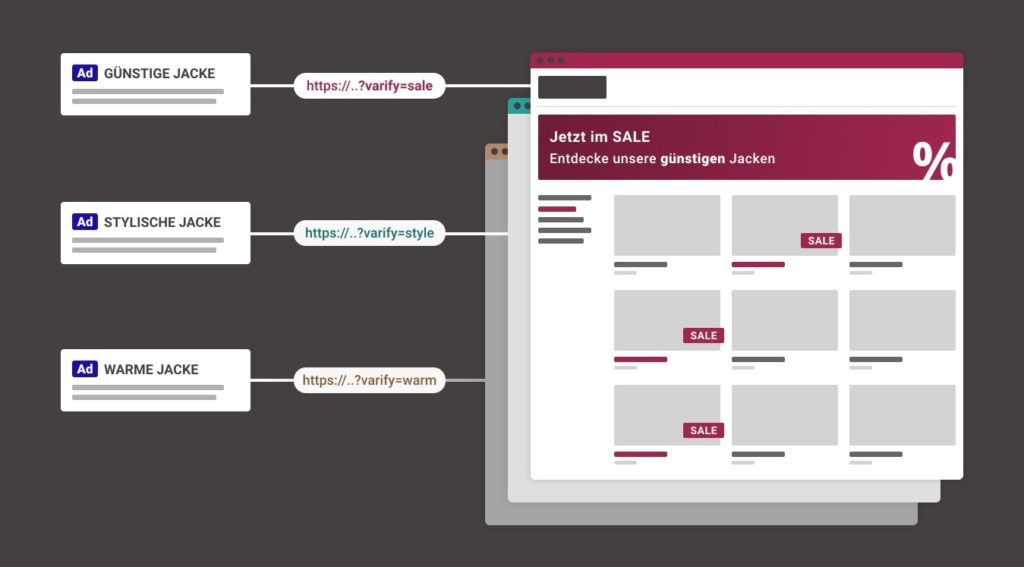
In this blog post, we will cover a neglected topic: dynamic landing pages. In this article, you will learn how you can use them to effectively increase your conversion rate and...