
Varify Gerçek Zamanlı Takip
17 Eylül 2026 tarihinden itibaren yeni oluşturulan hesaplar, „Tracking Setup“ bölümünden doğrudan „Varify Realtime Tracking“ özelliğini etkinleştirebilirler. Mevcut müşteriler, talepte bulunmaları halinde bu özelliği [email protected].
İçindekiler tablosu
Kısa ve tatlı
Varify Gerçek Zamanlı İzleme özelliğini etkinleştirin ve deneylerinizi Varify'da anında, gecikme olmaksızın değerlendirin. Özel bir Varify İzleme hizmeti, tanımladığınız hedefleri ölçer ve bunları Varify Raporlama bölümünde gösterir.
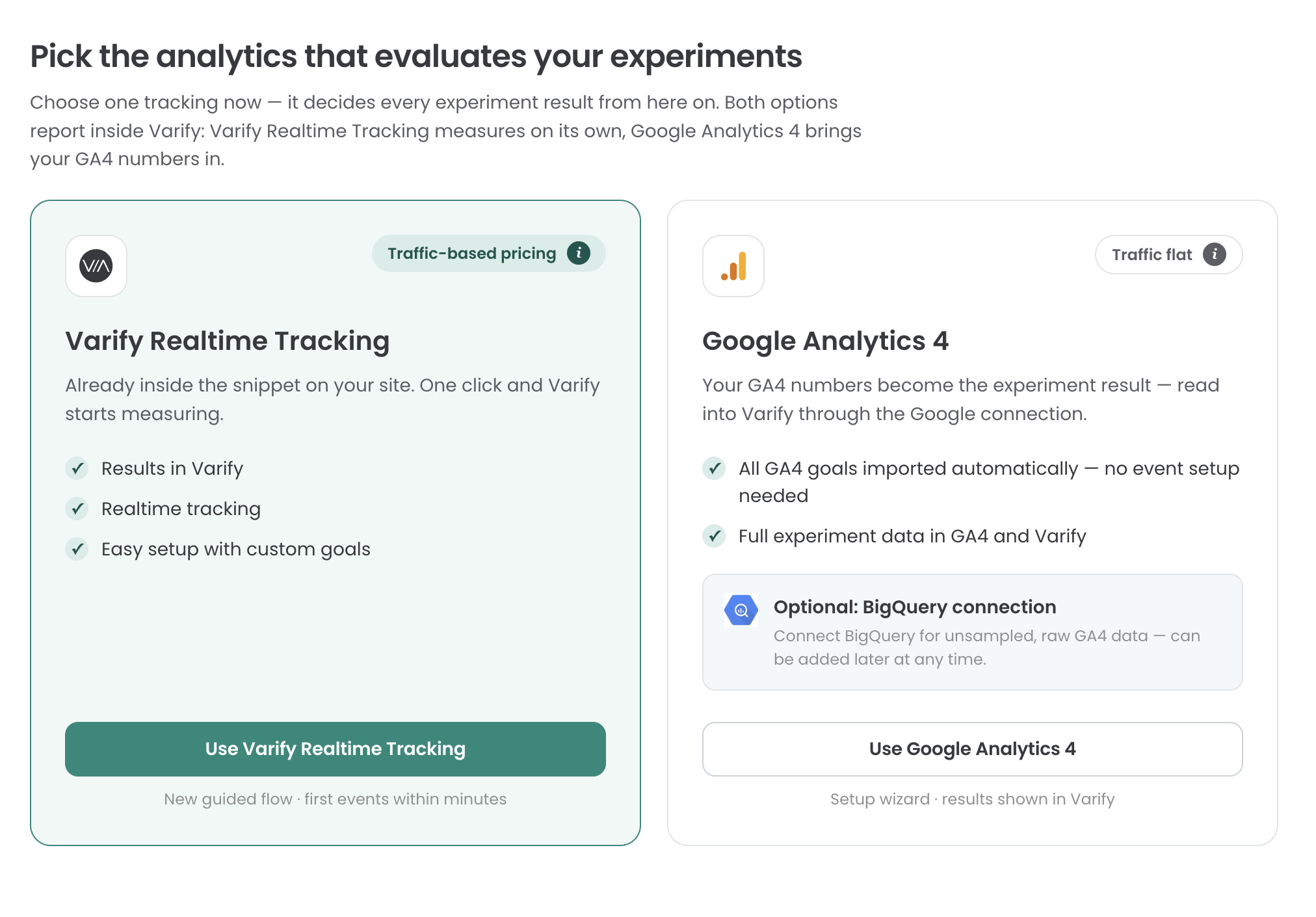
Varify Gerçek Zamanlı İzleme özelliğini şu şekilde kullanabilirsiniz
1. Adım: İzleme kurulumunu yap
„Tracking Setup“ bölümüne git ve „Varify Realtime Tracking“ seçeneğini seç. Ardından, Varify izleme özelliğinin „Kullanıcı Onayı“ ile mi yoksa onsuz mu entegre edileceğine karar verebilirsin. Karar verirken bu sayfa sana yardımcı olabilir: https://varify.io/en/varify-tracking-gdpr-compliance/

2. Adım: Varify Gerçek Zamanlı İzleme Özelliğinin Etkinleştirilmesi
Kullanıcı onayı olmadan entegrasyon
Varify Gerçek Zamanlı İzleme’yi kullanıcı onayı olmadan yüklemeye karar verdiysen, temel izleme kurulumun zaten tamamlanmış demektir ve 3. adıma geçebilirsin.
Kullanıcı onayı ile entegrasyon
Kullanıcı onayı ile entegrasyon için sana bir etkinleştirme komut dosyası sağlanacaktır. Bu komut dosyası yüklendiği anda izleme etkinleştirilir. Komut dosyasını, Onay Yönetimi Platformunun (CSP) yönergelerine uygun şekilde entegre et. Bunun için, sayfa açılışında ve geçerli bir onay sinyali olduğunda GTM aracılığıyla entegrasyon da kullanılabilir.

3. Adım: Varify Hedeflerini Ayarlama
Deneylerini değerlendirmek için Hedefler oluşturursun. Hedefler bölümünü sol taraftaki kenar çubuğunda bulabilirsin.
"Hedefler" bölümünde, "Tıklama Hedefi", "Sayfa Görüntüleme Hedefi" ve "Özel Hedef" olmak üzere 3 hedef türü arasından seçim yapabilirsin.

Tıklama Hedeflerinin Oluşturulması
Click Goals ile deney katılımcılarının öğelere ne sıklıkla tıkladığını ölçebilirsin. Bunun için öğe üzerinde özel bir seçici tanımlaman gerekir. Bir öğe için özel bir seçici belirlemek üzere, örneğin Varify’ın görsel düzenleyicisini kullanabilirsin. Bunu açın ve ölçülmesini istediğiniz öğeyi seçin. Ardından seçiciyi kopyalayın ve Click Goal'da "Seçici" alanına girin.
Sayfa Görüntüleme Hedeflerinin Oluşturulması
Sayfa Görüntüleme Hedefleri ile, deney katılımcılarınızın sayfaları veya sayfa türlerini ne sıklıkla görüntülediğini ölçebilirsiniz. Bunun için, kendi kurallarınızı kolayca tanımlayarak, tanımınıza uyan sayfa görüntülemelerini ölçebilirsiniz.
Özel Hedeflerin Oluşturulması
Özel Hedefler sayesinde kendine özgü hedefler oluşturabilirsin. Örneğin, siparişinin gelir değerini ölçmek istediğinde bu işlevi kullanabilirsin. Özel Hedefler, deneyinde JavaScript aracılığıyla tetiklenir.
Dönüşüm sayımı
Bu ayar ile bir hedefin tek seferlik mi yoksa birden fazla kez mi ölçüleceğini belirleyebilirsiniz. Varsayılan olarak, A/B testlerinde her hedef yalnızca bir kez ölçülür; zira genellikle kullanıcı hedefin ulaşmış olup olmadığıyla ilgilenilir. Buna karşılık, gelir hedeflerinde birden fazla ölçüm yapılması uygun olabilir: Bu durumda, bir kullanıcının sipariş tutarı birden fazla oturum boyunca biriktirilebilir.

Shopify Ödeme Hedeflerinin İzlenmesi
„Purchase“ veya „Start Checkout“ gibi Shopify Etkinlik Hedefleri, web siten üzerinden doğrudan ölçülemez. Shopify, 2025 yılından itibaren bu hedeflerin artık yalnızca web sitenizdeki Özel Piksel aracılığıyla ölçülebileceğini zorunlu hale getirmiştir. Bu hedefleri ölçebilmek için „Ayarlar > Müşteri etkinlikleri“ bölümüne gidin ve „Özel piksel ekle“ düğmesine tıklayın. Piksel adını „Varify Realtime Tracking“ olarak belirleyin ve "Piksel Ekle"ye tıklayın.

Pixel’i oluşturduktan sonra, öncelikle „Customer privacy“ bölümünü açın ve “Data sale” ayarında “Data collected does not qualify as data sale” seçeneğinin işaretli olduğundan emin olun. Varify veri satmaz ve yalnızca deney değerlendirmeleriniz için toplu verileri izler.
„Permission“ (İzin) seçeneğinde, yukarıda izleme ayarlarında belirlediğin gibi kullanıcı onayı olmadan ölçüm yapmak istiyorsan „Not required“ seçeneğini seçmelisin. Öte yandan, kullanıcı onayıyla ölçüm yapıyorsan, ayarı “Required” olarak bırakabilirsin.

Ardından, bu paragrafın altında işaretlenmiş kodu kopyalayın ve bunu “Kod” bölümüne yapıştırın.

					/**
 * Varify Shopify Web Pixel — links experiments/variations a customer saw to
 * whether they completed a purchase.
 */

let storage;

// Store's currency, used to normalize order totals before sending them.
const SHOP_CURRENCY = init.data?.shop?.paymentSettings?.currencyCode || 'EUR';

// Free FX API, used only when an order's currency differs from the store's.
const FX_API = 'https://api.frankfurter.dev/v1/latest';
const FX_TTL_MS = 6 * 60 * 60 * 1000;
const FX_TIMEOUT_MS = 2000;

const VARIFY_INGESTION_ENDPOINT = 'https://w.varify.io/events';

// One id per pixel session, reused for every event this pixel sends.
const pixelSessionId = crypto.randomUUID();

// Reads this pixel's saved data (experiments seen, anonymous id, etc.),
// cached in-memory after the first read.
async function getVarifyData() {
  if (storage) {
    return storage;
  }
  storage = (async () => {
    try {
      const raw = await browser.localStorage.getItem('varify-data');
      return raw ? JSON.parse(raw) : {};
    } catch (error) {
      // Don't cache a broken read — retry from scratch next time.
      storage = undefined;
      console.error('Varify: error reading local storage', error);
      return {};
    }
  })();
  return storage;
}

// Units of `currency` per 1 unit of the store's currency, or null if
// unavailable — callers should skip sending rather than guess a rate.
async function getFxRate(currency) {
  const cacheKey = `varify-fx-${SHOP_CURRENCY}-${currency}`;

  try {
    const cached = await browser.localStorage.getItem(cacheKey);
    if (cached) {
      const { rate, ts } = JSON.parse(cached);
      if (rate && ts && Date.now() - ts < FX_TTL_MS) {
        return rate;
      }
    }
  } catch (error) {
    // Fall through and fetch fresh below.
  }

  try {
    const url = `${FX_API}?from=${encodeURIComponent(SHOP_CURRENCY)}&to=${encodeURIComponent(currency)}`;

    let res;
    if (typeof AbortController === 'function') {
      const controller = new AbortController();
      const timer = setTimeout(() => controller.abort(), FX_TIMEOUT_MS);
      try {
        res = await fetch(url, { signal: controller.signal });
      } finally {
        clearTimeout(timer);
      }
    } else {
      res = await fetch(url);
    }

    if (!res.ok) {
      console.warn(`Varify: FX API returned ${res.status} for ${currency}.`);
      return null;
    }

    const json = await res.json();
    const rate = json?.rates?.[currency];

    if (typeof rate !== 'number' || !isFinite(rate) || rate <= 0) {
      console.warn(`Varify: FX API gave no usable rate for ${currency}.`, json);
      return null;
    }

    await browser.localStorage.setItem(
      cacheKey,
      JSON.stringify({ rate, ts: Date.now() }),
    );
    return rate;
  } catch (error) {
    console.warn(`Varify: FX lookup failed for ${currency}.`, error);
    return null;
  }
}

// Varify's endpoint only accepts flat text/number values, so a list of
// experiments becomes two comma-separated strings (ids and variation ids).
function flattenExperiments(entries) {
  return {
    experiment_ids: entries.map((entry) => entry.experimentId).join(','),
    variation_ids: entries
      .map((entry) =>
        entry.variationId === null ? 'original' : entry.variationId,
      )
      .join(','),
  };
}

// Edge's identifier also contains "Chrome/", so it must be checked first.
function detectBrowser(userAgent) {
  if (userAgent.includes('Firefox/')) return 'Firefox';
  if (userAgent.includes('Edg/')) return 'Edge';
  if (userAgent.includes('Chrome/')) return 'Chrome';
  if (userAgent.includes('Safari/')) return 'Safari';
  return 'Unknown';
}

function detectDevice(userAgent) {
  if (/Tablet|iPad/i.test(userAgent)) return 'tablet';
  if (/Mobi|Android/i.test(userAgent)) return 'mobile';
  return 'desktop';
}

function detectOs(userAgent) {
  if (/iPhone|iPad|iPod/i.test(userAgent)) return 'iOS';
  if (userAgent.includes('Android')) return 'Android';
  if (userAgent.includes('Win')) return 'Windows';
  if (userAgent.includes('Mac')) return 'macOS';
  if (userAgent.includes('Linux')) return 'Linux';
  return 'Unknown';
}

// Browser timezone, e.g. "Europe/Berlin" — not GPS or IP-based location.
function detectLocation() {
  try {
    return Intl.DateTimeFormat().resolvedOptions().timeZone || undefined;
  } catch {
    return undefined;
  }
}

// Non-identifying browser/page details, added to every event. The pixel
// sandbox may not expose all of these — each lookup is best-effort and
// simply omitted if unavailable.
function collectBrowserInfo() {
  const info = {};

  try {
    const userAgent =
      typeof navigator !== 'undefined' ? navigator.userAgent : undefined;
    if (typeof userAgent === 'string') {
      info.userAgent = userAgent;
      info.browser = detectBrowser(userAgent);
      info.device = detectDevice(userAgent);
      info.os = detectOs(userAgent);
    }
  } catch (error) {
    // Not available in this environment.
  }

  try {
    if (typeof window !== 'undefined' && window.location) {
      info.path = window.location.pathname;
      info.domain = window.location.hostname;
    }
  } catch (error) {
    // Not available in this environment.
  }

  const location = detectLocation();
  if (location) {
    info.location = location;
  }

  return info;
}

// Sends one event to Varify. Never throws — failures are logged and
// swallowed so the pixel/checkout is never affected. Falls back to reading
// the anonymous id from local storage if one wasn't passed in, and returns
// whichever id was actually used so the caller can persist it.
async function sendVarifyEvent(name, teamSqid, anonymousId, properties) {
  const anonymousIdWithFallback =
    anonymousId || localStorage.getItem('varify_anonymous_id');

  if (!teamSqid || !anonymousIdWithFallback) {
    console.warn(
      `Varify: skipping "${name}" event — missing teamSqid or anonymousId.`,
      'Team Sqid',
      teamSqid,
      'Anonymous ID',
      anonymousIdWithFallback,
    );
    return anonymousIdWithFallback;
  }

  try {
    await fetch(VARIFY_INGESTION_ENDPOINT, {
      method: 'POST',
      keepalive: true,
      headers: {
        'Content-Type': 'application/json',
      },
      body: JSON.stringify({
        events: [
          {
            id: crypto.randomUUID(),
            name,
            teamId: String(teamSqid),
            anonymousId: anonymousIdWithFallback,
            sessionId: pixelSessionId,
            properties: { ...collectBrowserInfo(), ...properties },
          },
        ],
      }),
    });
  } catch (error) {
    console.error(`Varify: error sending "${name}" event`, error);
  }

  return anonymousIdWithFallback;
}

// Fired by Varify's tracking script when a customer is shown an experiment.
// Remembers it locally so it can be attached to a later checkout event.
analytics.subscribe('varify', async (event) => {
  const {
    varify_experimentId,
    varify_variationId,
    varify_anonymousId,
    teamId,
    teamSqid,
    storageType = 'localStorage',
  } = event.customData || {};

  if (!varify_experimentId || !teamId || !teamSqid) {
    console.warn('Varify: event missing experimentId or teamId. Event:', event);
    return;
  }

  const validVariationId =
    varify_variationId !== undefined ? varify_variationId : null;

  const existingData = await getVarifyData();

  if (!existingData.data) {
    existingData.data = [];
  }

  const experimentEntry = {
    experimentId: varify_experimentId,
    variationId: validVariationId,
    timestamp: Date.now(),
  };

  existingData.data = existingData.data.filter(
    (entry) => entry.experimentId !== varify_experimentId,
  );

  existingData.data.push(experimentEntry);
  existingData.teamId = teamId;
  existingData.teamSqid = teamSqid;
  existingData.storageType = storageType;

  // Only present once Varify's tracking script has finished loading —
  // don't overwrite a previously-saved id with nothing.
  if (varify_anonymousId) {
    existingData.anonymousId = varify_anonymousId;
  }

  await browser.localStorage.setItem(
    'varify-data',
    JSON.stringify(existingData),
  );
});

// How long an experiment exposure counts toward a later purchase.
const WINDOW_MS = 28 * 24 * 60 * 60 * 1000;

const pruneEntries = (entries) => {
  const threshold = Date.now() - WINDOW_MS;
  return (entries || []).filter(
    (entry) =>
      entry.timestamp && entry.experimentId && entry.timestamp >= threshold,
  );
};

analytics.subscribe('checkout_started', async (event) => {
  const existingData = await getVarifyData();
  if (!existingData.data || existingData.data.length === 0) {
    return;
  }

  existingData.data = pruneEntries(existingData.data);

  await browser.localStorage.setItem(
    'varify-data',
    JSON.stringify(existingData),
  );

  if (existingData.data.length > 0) {
    const resolvedAnonymousId = await sendVarifyEvent(
      'checkout_started',
      existingData.teamSqid,
      existingData.anonymousId,
      flattenExperiments(existingData.data),
    );

    // Persist the fallback id, if used, so it doesn't need re-deriving.
    if (
      resolvedAnonymousId &&
      resolvedAnonymousId !== existingData.anonymousId
    ) {
      existingData.anonymousId = resolvedAnonymousId;
      await browser.localStorage.setItem(
        'varify-data',
        JSON.stringify(existingData),
      );
    }
  }

  // Warm the rate while the customer is still typing.
  const currency = event.data?.checkout?.currencyCode;
  if (currency && currency !== SHOP_CURRENCY) {
    getFxRate(currency);
  }
});

analytics.subscribe('checkout_completed', async (event) => {
  const orderId = event.data?.checkout?.order?.id;
  const money = event.data?.checkout?.subtotalPrice;
  let orderRevenue = money?.amount;
  const orderCurrency = money?.currencyCode;

  // 0 is a valid revenue (100% discount) and must not count as missing.
  if (!orderId || orderRevenue == null || !orderCurrency) {
    console.warn(
      'Varify: checkout_completed missing orderId, revenue or currency.',
    );
    return;
  }

  // subtotalPrice is presentment currency and the event carries no rate or
  // shop-money amount. Convert to shop currency here, or skip.
  if (orderCurrency !== SHOP_CURRENCY) {
    const rate = await getFxRate(orderCurrency);
    if (!rate) {
      console.warn(
        `Varify: skipping order ${orderId} — ${orderRevenue} ${orderCurrency}, no FX rate available.`,
      );
      return;
    }
    const converted = +(orderRevenue / rate).toFixed(2);
    console.info(
      `Varify: converted order ${orderId} — ${orderRevenue} ${orderCurrency} @ ${rate} -> ${converted} ${SHOP_CURRENCY}.`,
    );
    orderRevenue = converted;
  }

  const parsedData = await getVarifyData();
  if (!parsedData.data || parsedData.data.length === 0 || !parsedData.teamId) {
    console.warn('Varify: no valid data in local storage.');
    return;
  }

  // The order-status page refires checkout_completed on every visit.
  if (!Array.isArray(parsedData.sentOrders)) {
    parsedData.sentOrders = [];
  }
  if (parsedData.sentOrders.includes(orderId)) {
    return;
  }

  parsedData.data = pruneEntries(parsedData.data);
  if (parsedData.data.length === 0) {
    return;
  }

  const lineItems = event.data?.checkout?.lineItems;
  let cartProducts = [];

  if (lineItems && Array.isArray(lineItems)) {
    cartProducts = lineItems
      .map((item) => {
        const productId = item.variant?.product?.id?.split('/').pop();
        const variantId = item.variant?.id?.split('/').pop();

        if (productId && variantId) {
          return {
            productId,
            variantId,
          };
        }
        return null;
      })
      .filter((p) => p !== null);
  }

  const resolvedAnonymousId = await sendVarifyEvent(
    'checkout_completed',
    parsedData.teamSqid,
    parsedData.anonymousId,
    {
      ...flattenExperiments(parsedData.data),
      order_id: String(orderId),
      value: orderRevenue,
      currency: SHOP_CURRENCY,
      cart_product_ids: cartProducts.map((p) => p.productId).join(','),
      cart_variant_ids: cartProducts.map((p) => p.variantId).join(','),
    },
  );

  // Persist the fallback id, if used, so it doesn't need re-deriving.
  if (resolvedAnonymousId) {
    parsedData.anonymousId = resolvedAnonymousId;
  }

  parsedData.sentOrders = [...parsedData.sentOrders, orderId].slice(-50);
  await browser.localStorage.setItem('varify-data', JSON.stringify(parsedData));
});
Kodu ekledikten sonra, menünün üst kısmındaki “connect” seçeneğine tıkla. Ardından Shopify izleme ayarların tamamlanmış olacaktır.
