
Varify® Snippet - Integration
Table of contents
In short
Embedding the Varify.io® snippet in your website or store systems can be done quickly. It's best to include the JavaScript snippet in the <head>-tag of your web page to prevent page flickering. If necessary, you can also use a tag manager for integration.
If you're unable to immediately integrate the snippet, you can try out our Google Chrome extension .
Snippet implementation
Integration in the area of the website (recommended)
If you want to integrate the Varify.io snippet into your website, it is important to place it as high up on the page as possible - ideally in the <head>-area. This ensures that the snippet is loaded correctly and without delays.
You have two options for integrating the snippet: synchronous and asynchronous. Both have their own advantages and disadvantages.
Depending on the specific requirements and structure of your website, you decide which implementation method is best for you.
How to integrate the Varify.io script synchronously
| Advantage | Disadvantage |
|---|---|
| Guarantees that the script is loaded before the web page is displayed. | May increase the loading time of the web page if there are problems loading the script. |
| No page flickering | If the script does not load, the entire web page may not be displayed. |
					<!-- Varify.io® code for YOUR ACCOUNT-->
<script>
  window.varify = window.varify || {};
  window.varify.iid = YOUR ACCOUNT ID;
</script>
<script src="https://app.varify.io/varify.js"></script>
Important: Replace “YOUR ACCOUNT ID” in line 4 with the account ID from your dashboard.
How to integrate the Varify.io script asynchronously
| Advantage | Disadvantage |
|---|---|
| Does not affect the loading time of the web page, because the web page is loaded in parallel. | There is a possibility that other scripts will be executed first, which may cause odd side effects. |
| The web page will continue to load even if there are problems loading the script. | Page flickering may occur |
					<!-- Varify.io® code for YOUR ACCOUNT-->
<script>
  window.varify = window.varify || {};
  window.varify.iid = YOUR ACCOUNT ID;
</script>
<script async src="https://app.varify.io/varify.js"></script>
Important: Replace “YOUR ACCOUNT ID” in line 4 with the account ID from your dashboard.
Integration via the Tag Manager
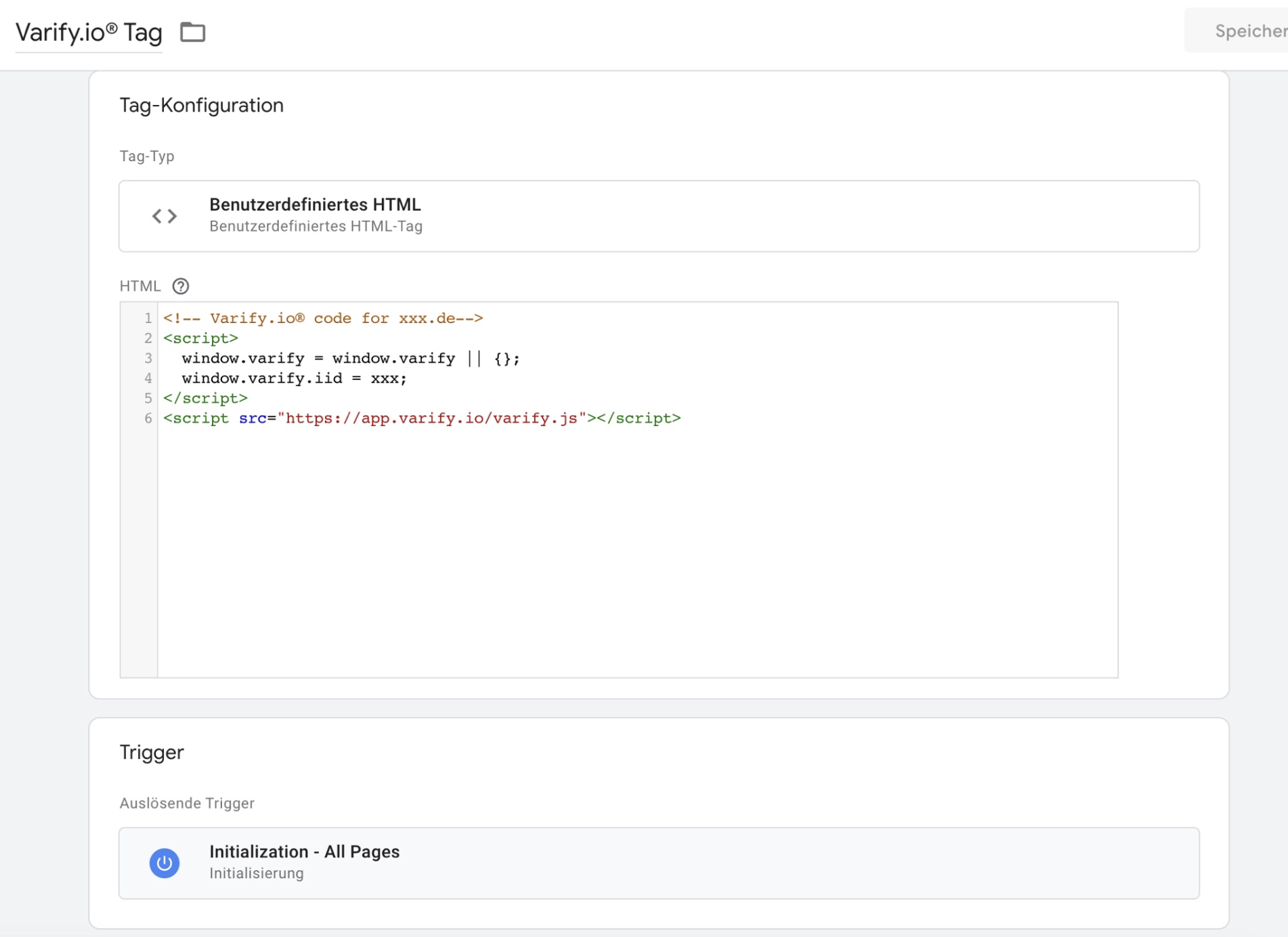
Integrating the JS snippet via Google Tag Manager is a quick way to integrate Varify.io® on your website. However, this option also carries the risk that a flickering effect is visible during delivery of a variation.
Simply create a custom HTML tag in your Tag Manager and insert the JavaScript code snippet. As a trigger, select the option to fire the tag on all pages as soon as possible. An option would be for example "Initialization - All pages". Note that there may be other options depending on the setup of your website.
Make sure that you replace "xxx" after the "window.varify.iid =" in the screenshot with your account ID.
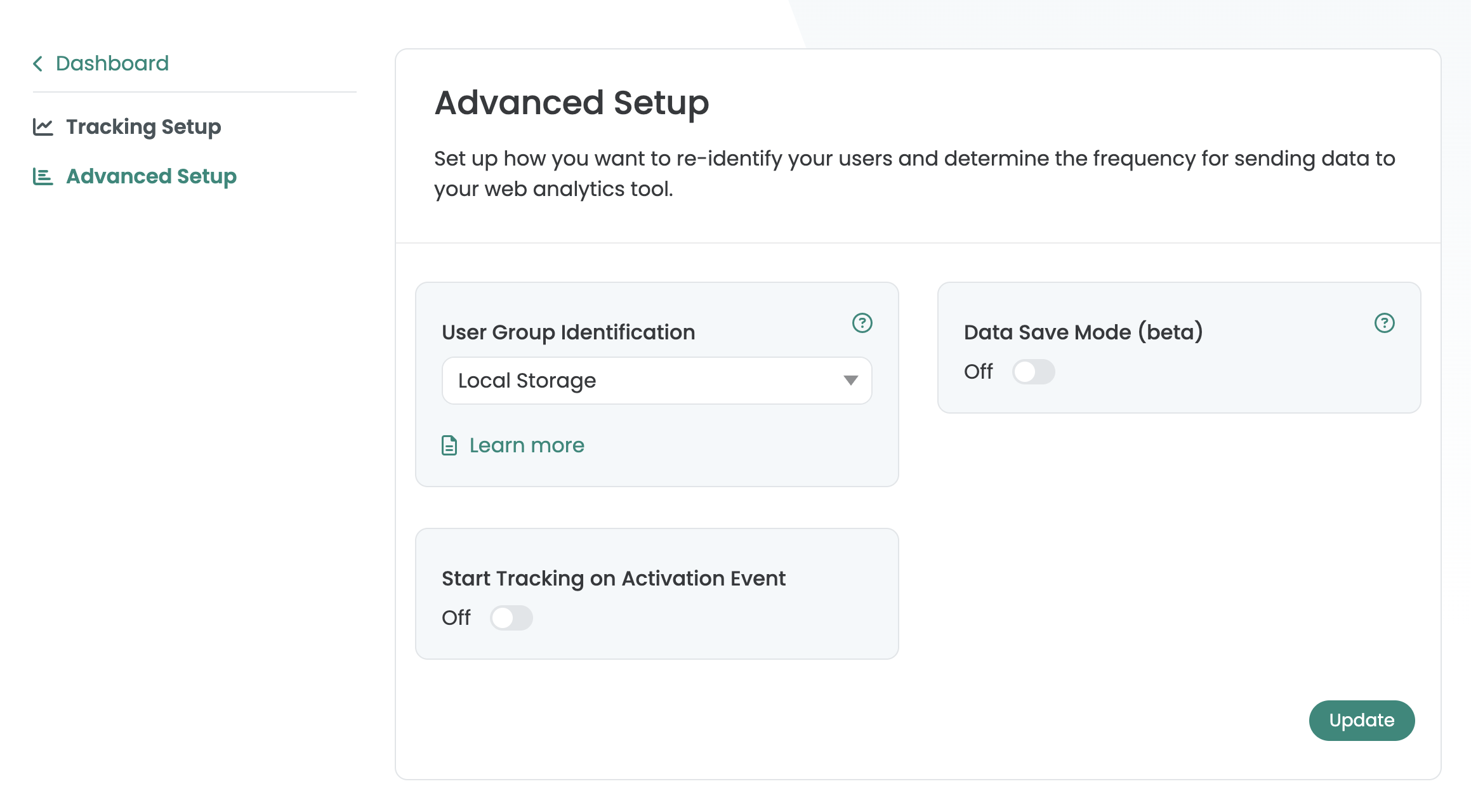
When integrating the Varify script via the GTM or when integrating it directly into the <body>deactivate the "Start Tracking on Activation Event" setting under Advanced Setup. This will ensure that your Varify Tracking works correctly.
Try out Varify.io via Chrome extension
You can download the Google Chrome extension in order to try out Varify.io. The extension will integrate the Varify.io snippet on your website exclusively for you in your browser. This means that only you edit and view variations in your browser.
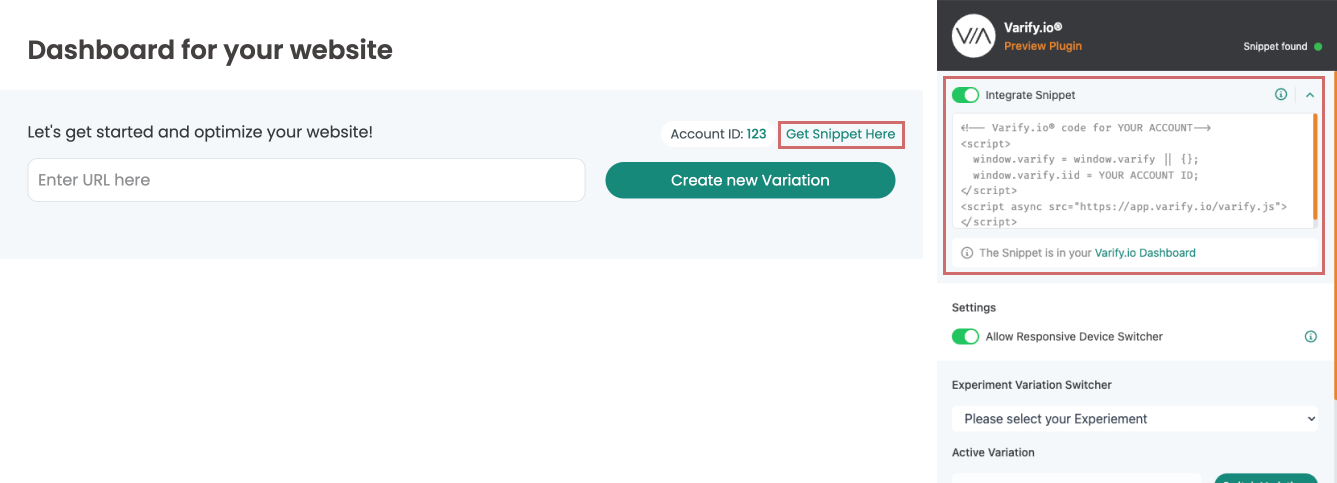
In order to implement your personalized snippet on your website without having to touch the code, follow the steps below:
- Download the Varify® Chrome Extension
- Activate the plugin in your browser
- Copy your Varify® code snippet from your dashboard (Get Snippet Here) and paste it into the "Your Snippet Code..." field in the extension -. Ready!
A more detailed explanation of installation and activation, as well as other functions, can be found here: Varify® Chrome browser extension
Avoid flickering during experiment playout
Flickering occurs when the page is already visible before Varify has fully applied the variant. The best way to avoid this is to include the snippet in the <head>.
If this is not sufficient or not technically possible, you can also use the anti-flicker script. You can find the instructions for this in the documentation: Anti-flicker script